The simplest way to send bulk emails to WordPress users without an external email marketing platform is to use WordPress user data, a self-hosted mailing plugin, and a reliable SMTP setup. This keeps the list inside the site, avoids monthly list-size fees, and works well for member updates, course notices, store alerts, and internal announcements. WordPress runs on over 43% of all websites, so this need is common for membership sites, shops, and communities.
TLDR: A site administrator can email WordPress users in bulk by installing a mailing plugin, connecting SMTP, segmenting users by role or activity, and sending in small batches. For example, a membership site with 2,400 subscribers could send a renewal reminder to only “Subscriber” users and avoid emailing admins or inactive test accounts. If the campaign gets a 32% open rate and 6% click rate, the owner can repeat the same segment for future reminders. This is cheaper than a full email marketing service, but it needs careful setup to avoid spam issues.
Why Send Bulk Email from WordPress?
Many WordPress sites already store useful contact data. A WooCommerce store has customers. A membership site has subscribers. An LMS has students. A forum has participants. Sending email from the same system can save time because the audience is already there.
It also prevents the annoying export-import routine. Honestly, it feels like a small task until an administrator has to export users, clean columns, upload CSV files, map fields, and fix rejected contacts. That can add 20 minutes to a simple announcement.
Bulk email from WordPress is best for:
- Member notices, such as renewal reminders or policy updates.
- Course emails, such as lesson releases or deadline alerts.
- Store messages, such as customer-only offers.
- Community updates, such as event news or maintenance windows.
- Internal user alerts, such as password policy changes.
The Basic Setup
A WordPress site should not send bulk campaigns through the default PHP mail function. That default method is weak, hard to track, and often blocked. Instead, the site owner should use three parts:
- A bulk email or CRM plugin to create campaigns.
- An SMTP plugin or mailer connection to send messages properly.
- Segments to choose the right users.
Common self-hosted options include newsletter plugins, CRM plugins, and user email plugins that work inside WordPress. Some store subscriber history in the WordPress database. Others add automation rules, tags, and campaign reports. The administrator should pick one that supports user roles, unsubscribe links, batch sending, and HTML email editing.
Step 1: Clean the User List
Before sending anything, the administrator should clean the user database. Bulk email is not just “select all and send.” That is how sites annoy people and hurt sender reputation.
The site owner should remove fake accounts, old test users, bounced addresses, and users with no valid reason to receive an email. If the site has customers, students, and admins, each group should be treated separately.
Useful segments include:
- Role: Subscriber, Customer, Student, Editor, or Member.
- Purchase history: Buyers of a specific product.
- Membership status: Active, expired, trial, or canceled.
- Course progress: Enrolled, completed, or inactive.
- Last login: Active users in the last 30, 60, or 90 days.
This step matters because smaller, relevant emails usually perform better. A message about a beginner course should not go to advanced users who already completed it last year.
Step 2: Install a Mailing Plugin
The plugin should allow the administrator to compose emails, select users, and send in batches. Batch sending is key. Sending 5,000 emails at once can slow the server or trigger host limits. Sending 100 to 300 emails per batch is safer for many shared hosting plans.
Good plugin features include:
- Role-based targeting for built-in WordPress users.
- Template editing with simple HTML support.
- Plain text fallback for better compatibility.
- Unsubscribe handling for non-transactional emails.
- Open and click tracking, if privacy rules allow it.
- Queue control to pause, resume, or retry failed sends.
The catch is that some plugins hide basic features behind add-ons. A site owner may install a “free” plugin, then find that segmentation, reports, or automation costs extra. That is not always bad, but it should be checked before setup.
Step 3: Use SMTP Instead of Default WordPress Mail
SMTP helps email providers verify that the message came from a real sender. The administrator can connect the site to an email account or sending server using an SMTP plugin. This does not have to be an email marketing platform. It can be the site’s business mail provider or hosting mail server.
For better delivery, the domain should also have:
- SPF to state which servers can send mail for the domain.
- DKIM to sign outgoing messages.
- DMARC to guide providers when messages fail checks.
These records are usually added in the domain DNS panel. If they are wrong, email may land in spam even when the content is fine. It drives people mad because the email “sent” inside WordPress, yet half the users never see it.
Step 4: Write the Email Carefully
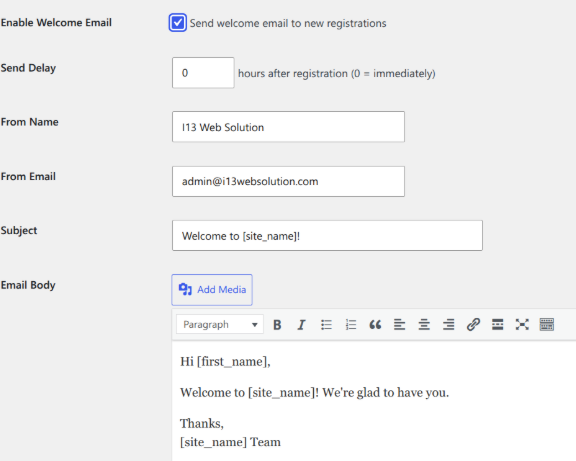
A good bulk email should be short and useful. The subject line should match the content. The sender name should be familiar. The message should include one main action, not five competing links.
A simple structure works well:
- Subject: Clear and specific.
- Opening: One sentence explaining the reason for the email.
- Body: Short details, bullet points, and a clear link.
- Footer: Contact details and unsubscribe option when needed.
Example subject lines:
- Your membership renewal is due this Friday
- New lesson available in the SEO course
- Scheduled maintenance on Sunday at 2 AM
Step 5: Test Before Sending
The administrator should send a test email to at least three inboxes, such as Gmail, Outlook, and a company address. The test should check layout, links, images, spelling, unsubscribe behavior, and mobile display.
If the site sends to many users, a small pilot group helps. For example, the administrator can send to 50 users first, wait 30 minutes, then check bounces and replies. If nothing breaks, the full batch can start.
Legal and Privacy Basics
Bulk email rules vary by country, but the safe pattern is simple. Email people who have a valid relationship with the site. Do not send promotions to users who only expected account alerts. Add an unsubscribe link for newsletters and offers. Keep records of consent when possible.
Transactional emails are different from promotional emails. A password reset, receipt, or account notice is usually transactional. A sale announcement is promotional. Mixing the two can create complaints.
When This Method Works Best
Sending bulk email from WordPress works best for small to mid-sized lists and user-based messages. A site with 500 to 10,000 users can often manage campaigns this way if hosting and SMTP limits are reasonable.
For huge lists, advanced automation, A/B testing, and deep reporting, a dedicated platform may still be easier. But for many site owners, that is overkill. They only need to tell real users about real updates.
[ai-img]email analytics, open rate, click report[/ai-img]
FAQ
Can WordPress send bulk emails by itself?
Yes, but the default mail function is not ideal. A plugin plus SMTP is much safer and more reliable.
Is an SMTP service the same as an email marketing platform?
No. SMTP handles email delivery. An email marketing platform usually includes list management, templates, automation, and reporting in one hosted system.
How many emails can a WordPress site send at once?
That depends on hosting limits, SMTP limits, and server resources. Many sites should send in batches of 100 to 300 emails instead of blasting the whole list at once.
Should every bulk email include an unsubscribe link?
Promotional emails and newsletters should include one. Transactional messages, such as receipts or password resets, usually do not need the same unsubscribe option.
What is the biggest risk?
The biggest risk is poor deliverability. Bad lists, missing DNS records, spammy wording, and too many emails sent too quickly can push messages into spam folders.
What plugin features matter most?
The most useful features are segmentation, batch sending, unsubscribe handling, template editing, and basic reports. Without those, bulk sending gets messy fast.